This post is co-authored with Olha Hladka, a former QA Engineer at QA Madness.
QA specialists familiar with test design techniques find it much easier to create efficient test suites. By employing a particular technique, we get guidelines on what to test and how to define test conditions. In other words, each test design technique helps to convert available data into efficient test cases.
In this post, you will learn about 5 commonly-used test design techniques that will help you ensure maximum test coverage and reduce time spent on testing activities.
Originally Published: Jan 22, 2021 | Last Updated: March 14, 2026
Let’s start with the basics. Test design is a stage of the quality assurance process, during which we create test scenarios and outline the structure of testing activities for the project. A QA team decides on how to escalate test coverage with minimum effort.
In 2026, when digital products are more complex than ever, this stage is where a QA company defines the “blueprint” for success. Whether you are using manual software testing or advanced automation testing services, the design phase makes sure that your QA resources are focused on the most critical parts of the application.
The main purpose of the test design process is to structure QA routines so it becomes easier to keep track of the requirements coverage. We need test design:
By applying these techniques, a software testing company can significantly reduce the “noise” of redundant tests. This is especially important when you decide to QA outsource, as it provides the external team with a clear, logical path for outsourced testing. According to the ISTQB standards, structured test design is the primary factor in achieving measurable quality targets.
What are test design techniques? They are strategies that help to write better test cases. The benefits of using test design techniques is an opportunity to create fewer tests while ensuring broad requirements coverage.
In 2026, the complexity of mobile QA and web ecosystems requires a mix of traditional logic and modern efficiency. There are a dozen of test design techniques you can use, but let’s focus on the most popular ones: Here are the 5 techniques that every quality assurance & testing company should utilize.
The equivalent class partitioning and boundary value analysis are probably the most frequently black-box test design techniques since they aim to reduce the number of necessary test scenarios.
Equivalence Partitioning is a technique where you divide test data into several partitions, assuming that all elements within one partition will be processed identically by the system.
The equivalent class partitioning implies splitting test data into classes, where all elements are similar in some way. This technique makes sense only if the components are similar and can fit in a common group. This allows a software QA services team to pick just one value from each group, significantly reducing the total number of tests.
Choosing this technique means that we are going to test only a few values from every group. Remember that doesn’t guarantee that the rest of the values not covered by the tests will be bug-free. We only assume that using several elements from the group will be quite illustrative.
The equivalent class partitioning is a good solution for cases when you deal with a large volume of incoming data or numerous identical input variations. Otherwise, it might make sense to cover a product with tests more closely.
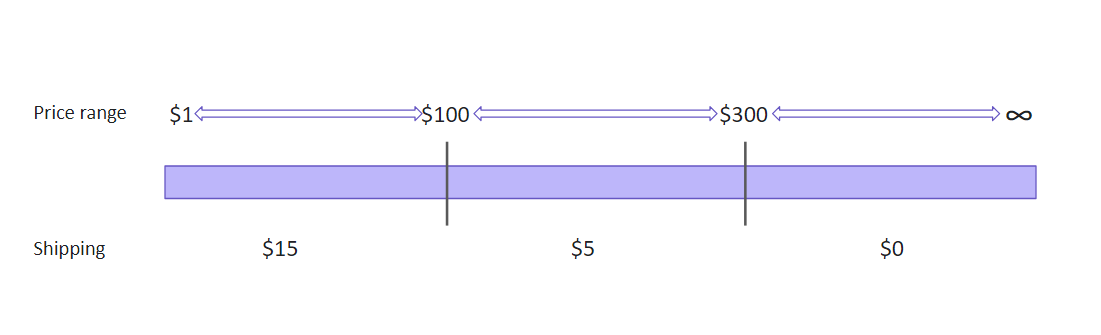
Let’s say, there is an online store that offers different shipping rates depending on a cart price. For example:
We have the following price ranges to work with:
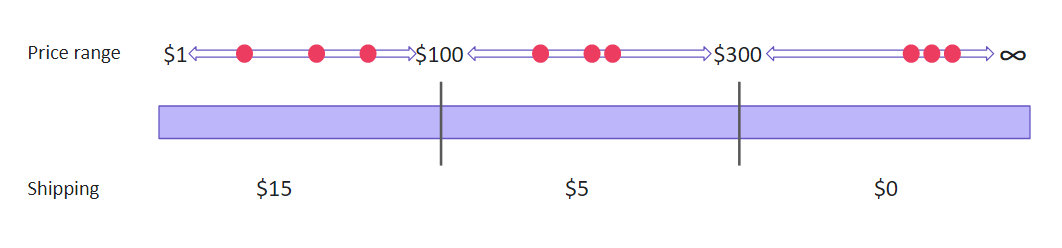
If you use the equivalent class partitioning technique, you get three sets of data to test:
1. From $1 to $100:
– valid boundary conditions: any price in the range from 1 to 99.99;
– invalid boundary conditions: any price below 1 or above 99.99;
2. From $100 to $300:
– valid boundary conditions: any price in the range from 100 to 299.99;
– invalid boundary conditions: any price below 100 or above 299.99;
3. $300 and higher:
– valid boundary conditions: any price above 299.99;
– invalid boundary conditions: any price below 300.
So, we can just pick several numbers from each price range and assume that the rest of alike inputs will show the same results.
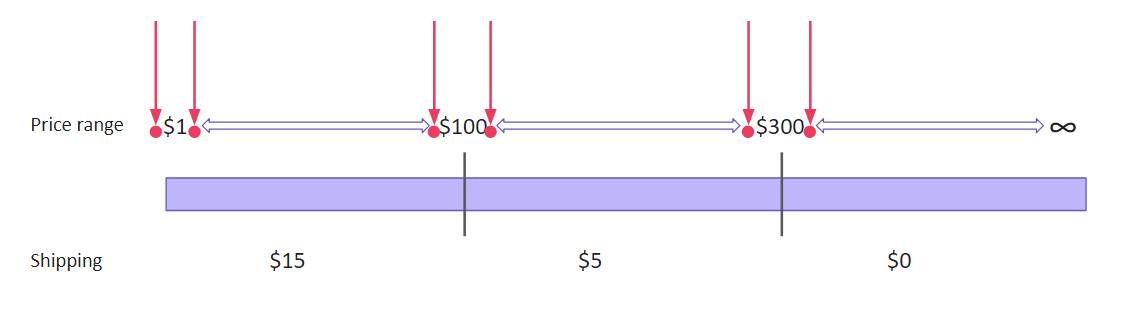
Boundary Value Analysis is based on testing at the boundaries between partitions. We test both valid and invalid boundaries to check how the system processes these values. Usually, developers make mistakes while writing the code for boundary values (e.g., using “<” instead of “<=”). BVA helps to detect such errors.
The boundary value analysis is similar to the previous technique. Some may even say it is based on the equivalent class partitioning. So what makes the boundary value analysis different?
We still group data in equivalent classes but don’t test values from a particular class only. Instead, we check boundary values, those that are at the ‘borders’ of the classes. The same logic works perfectly for integration testing. We check smaller elements during unit testing, and on the next level, the errors are likely to pop up at the unit junctions.
Let’s take the previous scenario with varying shipping rates. We have the same data but a different approach to using it. Assuming that errors are the most likely to occur at the boundaries, we test only the ‘boundary’ numbers:
State Transition Testing is used for systems where the output depends on the previous state and the current input. It helps to check how the application moves from one “state” to another after a specific action.
The state transition visualizes the states of a software system at different time frames and stages of usage. Visual information is simpler to perceive compared to verbal description. Therefore, the state transition allows you to come up with ultimate test coverage more quickly. This technique is effective for creating test suites for systems that have many state variations. It will be helpful if you test a sequence of events with a finite number of input options.
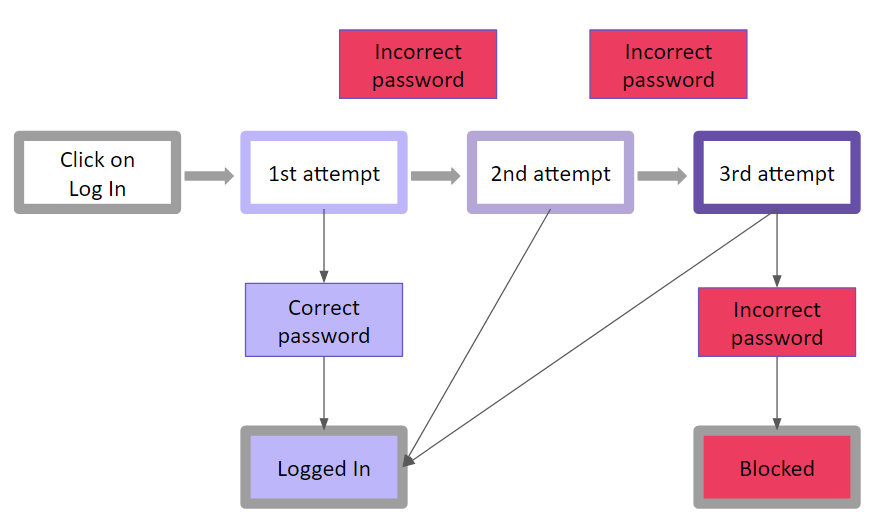
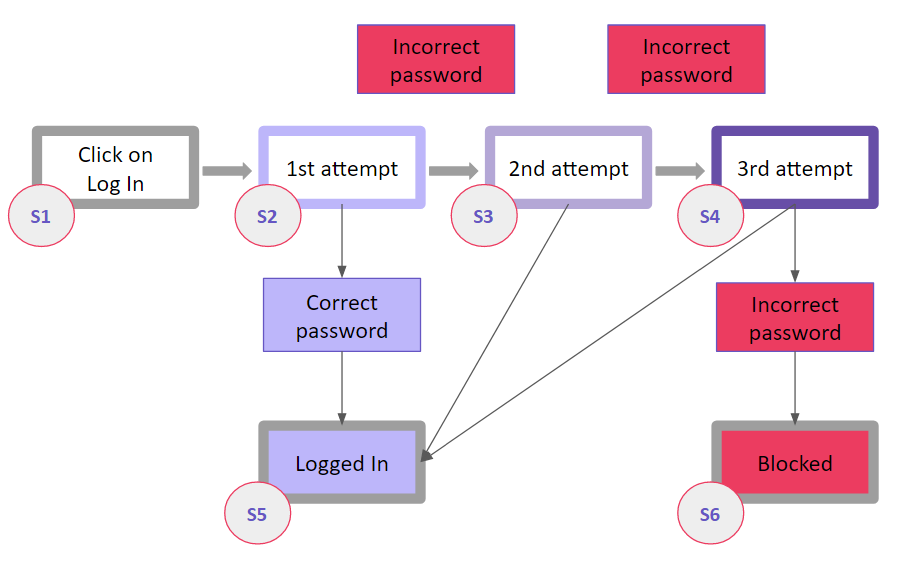
The simplest example of the state transition is visualizing logging into an account during web or mobile app testing. Let’s say, we are testing a system that offers a limited number of attempts to enter a correct password. If a user fails to enter a correct password, the system blocks the access (temporarily or permanently, it doesn’t matter now). A logic diagram would look like this:
Blocks of different colors designate specific states of the system. Let’s add the labels designating states, and we’ll get the following:
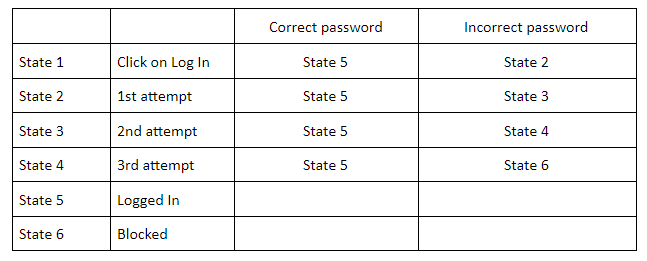
A chart like this makes it easier to match possible inputs with expected outputs. Having a visualization right in front of your eyes helps to keep a clear head and connect the states correctly. You can later arrange the data concisely and conveniently – for example, in a table to look up to during testing:
The pairwise testing is considered the most difficult and confusing of the five test design techniques. And there is a good reason for this. The pairwise testing is based on mathematical algorithms, namely combinatorics. It makes it possible to create unique pairs and test a huge amount of incoming data in different combinations, but the calculations might get complicated. To cover the maximum of features with test scripts that will require minimum time for testing, you need to match data correctly, combining pairs in a specific way based on the calculations.
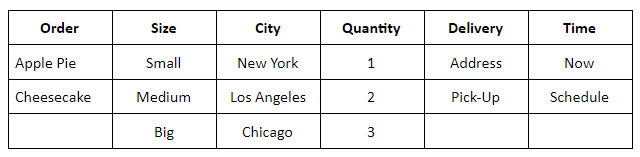
Let’s say, there is a network of bakeries selling apple pies and cheesecakes online. Each is available in three sizes – small, medium, and big. The bakery offers immediate and scheduled address delivery, as well as a pick-up option. The bakery works in three cities – New York, Los Angeles, and Chicago. Also, a user can order up to three items at a time.
If you want to test all possible inputs, that would be 2x3x3x3x2x2=216 valid order combinations. However, checking each of those would be unreasonable. Instead, you can arrange the variables in a way that will allow covering maximum scenarios.
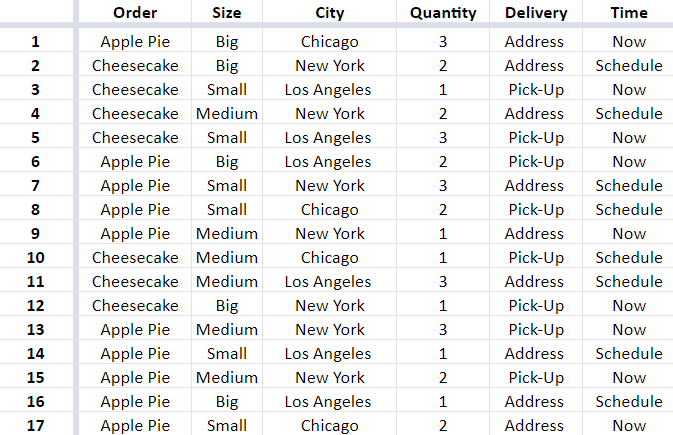
To do this, you’ll need to group the variables or use one of the tools that can do it for you. We used Pairwise Online Tool o create this example. As a result, we got 17 scenarios able to cover all 216 combinations. You can see the list of combinations below.
Error guessing is the most experimental practice of all, usually applied along with another test design technique. In error guessing, a QA engineer predicts where errors are likely to appear, relying on previous experience, knowledge of the system, and product requirements. Thus, a QA specialist is to identify spots where defects tend to accumulate and pay increased attention to those areas.
As a rule, QA engineers start with testing for common mistakes, such as:
The more experience your QA resources have, the more scenarios they can find. This is why many companies prefer QA outsourcing — to get access to specialists who have seen these patterns across hundreds of different apps.
In the era of automation testing services, you cannot just “automate everything.” You need a test automation strategy built on solid test design.
By using EP and BVA, you can identify the exact scripts needed for automating regression testing, ensuring your robot isn’t wasting time on redundant checks. Research from the IEEE Standards Association highlights that structured test design is the foundation of high-velocity development, as it prevents “flaky” tests and minimizes maintenance.
A correctly chosen test design technique helps to use QA resources smartly. Very often, QA engineers need to combine several test design techniques to ensure the most effective coverage. The correct combination always depends on a specific project. Some specialists choose a particular approach intuitively, without referencing the theory much. Well, with years, you start to do some things reflexively.
Whether you are looking for mobile QA support or a full dedicated QA team, starting with professional test design is the only way to ensure a high-quality release. Many firms choose software testing outsourcing to get this expertise immediately. By partnering with an experienced software testing company, you ensure that your quality isn’t left to chance.
No. While it started with manual testing, it is even more critical for test automation services to ensure you aren’t automating unnecessary scenarios.
State Transition Testing is highly recommended because mobile apps rely heavily on navigation, screen changes, and hardware states (like switching from Wi-Fi to 5G).
It depends on the requirements. For simple inputs, BVA and EP are best. For complex logic, we use Decision Tables. An outsourced QA partner will typically perform an audit to decide the best mix for your ROI.
On its own, no. But when used by an experienced software QA services provider alongside BVA, it often finds the “weird” bugs that structured logic might miss.
Ready to optimize your testing? From QA outsourcing to high-velocity automation testing services, we help you build a product that lasts.
If you are running a digital business in 2026, you’ve likely heard that automation is…
With the sharp shift in how cyber resilience is approached and the EU’s CRA introducing…
From the start, automated testing services have been hailed as the best invention since sliced…
If you are an executive or business owner launching a digital product today, relying only…
Automated GUI testing is a sort of controversial topic. It offers advanced speed, consistency, coverage,…
Objectively, CI/CD and security testing services don’t go together. Yet, in 2026, velocity and scrutiny…