Blog

Check the latest testing insights, trends, and best practices on the QA Madness blog.

How to Use iOS 18 Update to Give Your App an Edge
Reading time: 5 min

How to Use iOS 18 Update to Give Your App an Edge

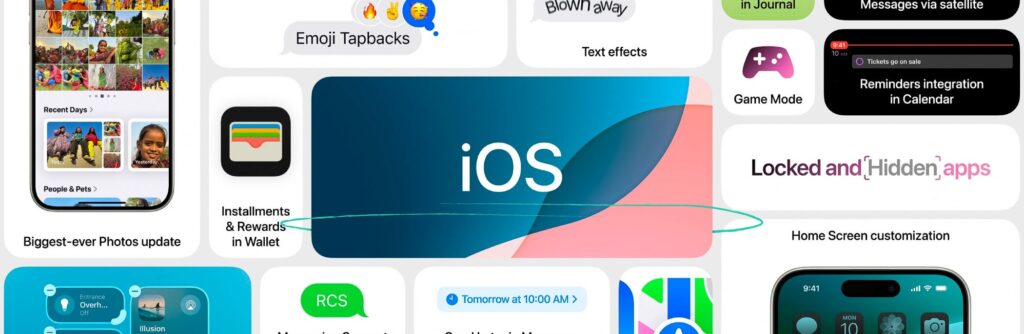
Mobile apps are all about ease of use and convenience. Nothing makes these two more prominent in your product than customization availability. Perhaps that’s why the new iOS 18 banked on fresh personalization and process simplification features. Today, we discuss Apple’s hot update and what it means for your applications. iOS 18’s New Features & Their Implications This article isn’t going to dissect and fawn over Apple’s new stuff. We’re going to talk about how you can benefit from it and what you should add to your own apps. That’s why we’ve picked only those features that will have the biggest impact on your product. Customizable App Icons Getting to set up your own space evokes a special sense of ownership and belonging. With iOS 18’s customization options, people can now spend even more time immersed in their phones by playing around with their app icons.  Apple now offers three styles for its icons: Light. Dark. Tinted. For u...

Read more
  • All Solutions
  • Accessibility Testing
  • Performance Testing
  • Regression Testing
  • All industries
  • E-Commerce & Retail
  • E-Learning
  • Fintech
  • Healthcare
  • Hospitality
  • Logistics & Delivery
  • Marketing & Sales
  • Media & Entertainment
  • Software Development
  • Sports & Fitness
  • Supply Chain
Black box and white box testing techniques
Reading time: 15 min

Balancing Black Box and White Box Testing Techniques to Supercharge Development

Software development is more mature than ever. And yet, we keep seeing the same old process and product issues. One of the core reasons for that is quality still being treated as a separate part of SDLC. Often, it doesn’t get enough tools and day-to-day presence, limiting its impact. Scalability issues, tech debt, compliance and security concerns… All of the things many know too well make it hard to achieve fine user experience and customer satisfaction -- metrics key to your success. While a full integration of quality engineering is the ultimate solution, it’s far from simple. Luckily, there are practical ways to reduce risks in the meantime. One of them is figuring out a balance between black box and white box testing techniques. That’s how you keep your team from burning out, manage your QA efforts smarter, and introduce meaningful improvements to product quality.  Let’s figure out how you can do that. What Are Black Box Testing Techniques? Black box testing techniques...
Read more
What is Smoke Testing
Reading time: 14 min

What is Smoke Testing and How to Build Release Confidence With It

You’ve spent weeks coding, the engineering team has grown, and the pressure to ship is higher than ever. But before you dive into complex feature checks, you need to answer one fundamental question: Does the application even work? In many fast-scaling startups, this is where the "release gridlock" happens. As your codebase expands, the "manual plateau" becomes a real threat -- where your team spends more time re-checking old features than building new ones. This is where smoke testing in software testing comes into play. Often referred to as "build verification testing" or a "confidence test," it acts as the primary gatekeeper of your entire development pipeline. As a dedicated quality assurance & testing company, we see teams skip this step in favor of rushing to market. The result is a staging environment that crashes five minutes after deployment, leaving developers frustrated and idle.  Implementing smoke testing as part of professional software testing services ensures that ...
Read more
Website accessibility AI tools
Reading time: 14 min

Accessibility and AI: A Combo Well Worth Exploring

When QA accessibility testing prioritizes speed, that’s the only thing it’ll get. The EAA deadline gave everyone a “nudge” to act as fast as possible. And it might have doomed many to fail. Why? Because quick automated scans catch only around 40% of issues. And your app can complete all WCAG success criteria and still disappoint users.  Value-generating accessibility is about strategically combining the thoroughness of manual software testing with the velocity of automated solutions. Today, we’ll explore how AI-driven accessibility tools support this approach without slowing you down or compromising quality: Precise use cases that accelerate development. A review of battle-tested tools. And best practices for AI accessibility solutions from a QA team with over a decade of experience. This is your quick guide to using AI-powered accessibility for practical results.  Why Traditional Accessibility Audits Can’t Keep Up? There’s one reason that makes traditional acc...
Read more
UX accessibility checklist
Reading time: 13 min

UX Accessibility: Why Compliance Alone Isn’t Enough (or the Point)

Accessibility compliance isn’t what you need to worry about. Because even if your code fully adheres to the EAA standards, your app can still feel like a puzzle to users. And then it doesn’t matter that you’ve covered the entire WCAG checklist. When a person doesn’t enjoy interacting with your product, they leave. That’s why your eyes should be on UX. Specifically, accessible UX.  UX accessibility defines an app that’s not just technically compliant but actually enjoyable. Today, we’ll break down how to secure the latter: Checklist that makes your project UX accessible. How to integrate accessibility in UX. Preparing your app for authentic user expectations. Turn up your white noise machine and focus. This is important.  What’s the Difference between UX Accessibility vs Technical Accessibility?  Imagine a lovely vacation booking site. It supports assistive tech, nails down focus states, offers detailed alt text -- the works. Now imagine a person using a scre...
Read more
Axe-core Playwright accessibility testing
Reading time: 15 min

A You-Oriented Guide to Axe-Core Playwright Accessibility Testing

The bulk of QA accessibility testing is manual checks. And they don’t pair well with modern, agile development. Especially now, when everyone is rushing to comply with the EAA. That’s why today, we’ll break down the combo of Playwright and Axe-core accessibility testing library. This automation duo lets you catch up to 50% of WCAG issues quickly, shrink feedback loops, and turn data into strategy insights.  In this article, we’ll learn how to: Set up Playwright accessibility testing with Axe-core. Prepare fundamental scans and customize your tests. Get the most out of the reporting features and more. This is an objective review from a QA team with a decade of experience. Let’s begin. Why Use Playwright & Axe-Core for Accessibility Testing? Accessibility testing with Playwright is like having a very meticulous, automated user. It opens the page in a real browser, clicks buttons, fills forms, opens menus… Basically, it goes through the site just like a person would....
Read more
How to Run a Website Accessibility Audit
Reading time: 18 min

How to Run a Website Accessibility Audit & Gain Long-Term Value

Let’s turn down the noise around the European Accessibility Act and its 2025-2030 deadline. Because all you truly need is a strategy. And all the benefits of adherence to the EAA will unfold. In this article, we’ll share our approach to a website accessibility audit: A straightforward 5-step framework. Building your toolchain. A clear website accessibility audit checklist. Using in-house vs external resources. Time and budgets are needed for the audit. Our accessibility testing services’ specialists are here to guide you through it all. What Is an Accessibility Website Audit? An accessibility audit of a website is a check that evaluates whether people with different abilities can use it without trouble. It’s basically someone going through your pages, testing how they work with assistive tools, checking the code, and looking for anything that might block or confuse users. The result is a clear list of what works, what doesn’t, and what you should fix to make your ...
Read more
WCAG accessibility audit
Reading time: 16 min

Mastering EAA Compliance with a Professional WCAG Accessibility Audit

Change is always a good thing. Even though complying with the European Accessibility Act is a lot of work, the reward is well worth it. You’ll broaden your potential customer pool by 1.3 billion people. You’ll upgrade your brand reputation. You’ll improve your product’s UX for all users. And you’ll advance your revenue and save money on possible non-adherence fines, which can go up to €500,000 per violation.  So, think of EAA compliance as not something that you have to do, but something that you should do. Because that something will give your project an impressive number of advantages. And the first step in obtaining those advantages is holding a WCAG accessibility audit.  What Are EAA, EN 301 549, & WCAG 2.1 AA Requirements? EAA is the law. EN 301 549 is the technical specification you must follow to comply with that law. And WCAG 2.1 accessibility standards are global guidelines designed to help companies secure accessibility. There’s a lot of info on this topic ri...
Read more
Android app performance testing
Reading time: 11 min

Android Performance Testing: From Resource Hog to Scalable, Low-Overhead Process

Android app performance testing should prevent and fix problems. Yet, it often becomes a problem itself. Performance testing is hard to do right due to the demand for precise expertise, extensive resources, and a long-term strategy. With Android apps, these challenges multiply thanks to the sheer number of devices and their specs. That’s why, no matter the company size, hotfixes, regressions that slow development, and scaling difficulties are common. Today, we review a QA-driven strategy that turns Android performance testing from a resource hog into a scalable, low-overhead process.  How Issues in Performance Testing for Android Manifest First, let’s get to know common issues in Android performance testing. We’ll discuss what creates them and their impact on your product. So, if a lot of things on the list sound familiar, it’s a clear sign that your performance testing services need more support.  Memory Leaks Memory leaks happen when the app keeps holding onto resources it...
Read more
Mobile app performance testing to scale easily
Reading time: 12 min

12 Mobile Performance Testing Checks That Secure Scalable Quality 

The fastest way to lose users is slow performance. The very first interaction a person has with your app is waiting for it to load. And what happens during this introduction is akin to the Big Bang -- your project’s going to be either a universe filled with possibilities or a hot mess. Naturally, you don’t want your customers to be greeted with lags, freezes, or crashes. And yet, they still happen. Quite often. Mobile app performance testing’s biggest trouble is its resource-intensiveness. Fast-growing companies struggle to keep QA coverage as features scale. And smaller organizations tend to “shrink” performance tests, covering the essentials only and dealing with the aftermath (hotfixes, support overload, etc.), which drains resources.  Today, we offer you a solution. This is a clear, universal mobile performance testing checklist that ensures scalable quality. What Separates Mobile Application Performance Testing As you know, performance testing services are difficult ...
Read more
1 2 3 40

Subscribe to our newsletter

QA Madness
Privacy Overview

This website uses cookies so that we can provide you with the best user experience possible. Cookie information is stored in your browser and performs functions such as recognising you when you return to our website and helping our team to understand which sections of the website you find most interesting and useful.